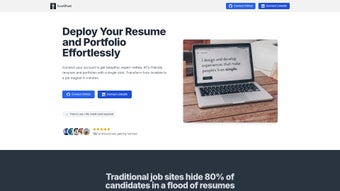

Download LeetPost – AI‑Powered Portfolio Builder, Free & Secure
Overview – Why LeetPost Stands Out
In today’s competitive tech job market, a static résumé often isn’t enough to capture the attention of hiring managers or automated applicant‑tracking systems (ATS). LeetPost answers that challenge by turning code repositories, project screenshots, and technical achievements into sleek, ATS‑friendly portfolio websites with just a few clicks. Powered by advanced artificial intelligence, the platform analyses your input, suggests concise achievement statements, and automatically formats them into professionally designed templates that are optimized for readability and SEO.
Whether you’re a seasoned senior engineer or a fresh graduate, LeetPost simplifies the entire process of building an online presence that showcases not only what you have built, but also how you think. The tool is hosted entirely in the browser, meaning there’s no bulky installer, no hidden fees, and no compromise on security—your data never leaves your device unless you explicitly publish the site. By providing a curated library of vetted templates tailored for developers, data scientists, and UI/UX designers, LeetPost ensures that every portfolio looks polished, loads quickly, and passes the stringent requirements of modern hiring pipelines.
The ultimate goal is to boost interview callbacks, shorten the job‑search cycle, and give tech professionals a reliable stage to highlight their capabilities. If you’ve ever struggled to present your GitHub projects in a compelling way, LeetPost offers a free, secure, and continuously updated solution that brings your digital résumé to life.
Key Features that Power Your Portfolio
- AI‑Generated Content: Automatically crafts achievement‑focused bullet points from your project descriptions, reducing writer’s block.
- ATS‑Friendly Templates: A collection of 15+ industry‑tested designs that pass keyword parsers and improve search visibility.
- One‑Click Deployment: Publish your portfolio to a custom sub‑domain or connect to your own domain in seconds.
- Responsive Design: All templates adapt flawlessly to desktop, tablet, and mobile screens without extra configuration.
- Live Preview & Editing: Real‑time preview mode lets you tweak layout, colors, and fonts while seeing instant results.
- Secure Cloud Storage: Optional encrypted backup of your portfolio data, ensuring you never lose your work.
- Integration with GitHub & GitLab: Pull project metadata, commit history, and screenshots directly from your repositories.
- SEO Optimization: Built‑in meta tags, schema markup, and sitemap generation to improve discoverability on search engines.
- Analytics Dashboard: Track visitor statistics, geographic data, and referral sources to understand audience engagement.
- Free Core Version & Paid Pro Add‑Ons: Access essential features at no cost, with optional premium modules for custom branding and advanced analytics.
Each feature has been carefully designed to address a specific pain point for developers seeking an online showcase. The AI engine leverages natural language processing to transform raw code descriptions into concise, impact‑oriented statements that recruiters love. Meanwhile, the ATS‑friendly templates follow best‑practice guidelines for keyword density, section ordering, and readability, giving you a higher chance of passing automated screenings.
The seamless integration with popular version‑control platforms means you can import your most recent commits and project screenshots without manual uploads, keeping your portfolio up‑to‑date with minimal effort. Whether you prefer a minimalist monochrome layout or a vibrant tech‑centric theme, LeetPost’s responsive designs guarantee a professional look on any device. All of these capabilities are delivered through a secure, browser‑based interface, meaning you can start building from any computer without worrying about installation hurdles or compatibility issues.
Getting Started: Installation, Usage & System Compatibility
LeetPost is a web‑based application, so there is no traditional installation process. To begin, simply visit leetpost.com, click the “Get Started for Free” button, and create an account using your email or social login. After confirming your email, you are taken to the dashboard where you can either start a new portfolio from scratch or import an existing GitHub/GitLab repository.
The import wizard walks you through connecting your account, selecting repositories, and choosing which projects to showcase. Once your data is imported, the AI assistant analyses each repository, suggests achievement statements, and populates the selected template. You can edit any generated text, rearrange sections, and customize visual elements using the drag‑and‑drop editor.
Because LeetPost runs entirely in the browser, it is compatible with any modern operating system that supports a recent version of Chrome, Firefox, Edge, or Safari. This includes Windows 10/11, macOS 11+ (Big Sur and later), Linux distributions, as well as mobile platforms like Android 10+ and iOS 13+. The responsive interface ensures a smooth experience whether you are working on a desktop workstation or a tablet.
After finalizing your design, click “Publish”. You can choose a free leetpost.io sub‑domain (e.g., yourname.leetpost.io) or configure a custom domain by updating your DNS records—LeetPost provides clear step‑by‑step instructions for both options. The platform also supports HTTPS by default, guaranteeing that visitors see a secure padlock icon in their browser. For ongoing maintenance, the dashboard includes a “Sync” button that re‑imports data from connected repositories, allowing you to keep your portfolio current with the latest commits and project updates. Should you need assistance, an extensive knowledge base and live chat support are available 24/7.
Pros, Cons, Frequently Asked Questions & Final Verdict
Pros
- AI‑driven content generation saves time and improves wording.
- Free core version provides essential features without hidden costs.
- ATS‑friendly templates increase chances of passing automated screenings.
- Responsive, browser‑based design works on all major OS and devices.
- Seamless GitHub/GitLab integration keeps portfolios up‑to‑date.
Cons
- Advanced branding and analytics require a paid Pro subscription.
- Limited offline capabilities – an internet connection is needed for publishing.
- Template library, while diverse, may feel restrictive for designers seeking full custom code control.
Is LeetPost really free to use?
Yes, the core version of LeetPost is completely free. It includes AI content generation, a selection of ATS‑friendly templates, and basic analytics. Premium features such as custom domain branding, advanced SEO tools, and detailed visitor analytics are available through a paid Pro plan.
Can I export my portfolio to a static HTML file?
LeetPost currently hosts portfolios on its own secure servers. However, you can download a ZIP package of the generated HTML, CSS, and assets via the “Export” option in the dashboard, allowing you to self‑host if you prefer full control.
How does the AI generate achievement statements?
The AI scans your project description, commit messages, and README files, extracts key actions, technologies, and outcomes, then rewrites them into concise, impact‑focused bullet points that align with industry terminology and keyword trends.
Is my data safe on LeetPost?
LeetPost uses SSL encryption for all data transmission and stores optional backups with AES‑256 encryption. You retain full ownership of your content, and the platform never shares your personal information with third parties without consent.
Do I need any technical knowledge to use LeetPost?
No. The intuitive drag‑and‑drop editor and AI assistance are designed for users of all skill levels. Even if you’ve never built a website before, you can create a professional portfolio in under an hour.
LeetPost ReviewLeetPost delivers a compelling mix of AI convenience and ATS‑aware design that fills a notable gap in the developer‑tool ecosystem. The free tier is generous enough for most job‑seekers, while the Pro upgrades provide valuable branding enhancements for freelancers and consultants. Its browser‑only nature removes installation friction, making it accessible from any device. The primary drawback is the reliance on an internet connection for publishing and the limited depth of template customization for users who prefer hand‑coded designs. Overall, LeetPost is a highly recommended tool for anyone serious about showcasing their technical work online.
Final Verdict: If you’re looking to transform your code repositories into a polished, interview‑ready portfolio without spending hours on design and copywriting, LeetPost is the solution you’ve been waiting for. Its AI‑driven workflow, ATS‑friendly templates, and cross‑platform availability make it a standout choice in the crowded market of portfolio builders. Click the button below to start building your professional showcase today—your next interview could be just one click away.



.png)



